
Mesclar leads e oportunidades similares
Odoo automatically detects similar leads and opportunities within the CRM app. These identified duplicate records can be merged, without losing any information in the process. Doing so keep the pipeline organized, and prevents customers from being contacted by more than one salesperson.
Identificar oportunidades e leads similares
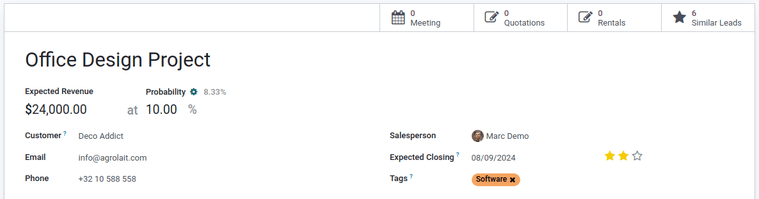
Similar leads and opportunities are identified by comparing the email address and phone number of the associated contact. If a similar lead/opportunity is found, a Similar Leads smart button appears at the top of the lead (or opportunity) record.
Compare similar leads and opportunities
To compare the details of similar leads/opportunities, navigate to CRM app -> Sales -> My Pipeline, or CRM app -> Leads. Open a lead or opportunity, and click the Similar Leads smart button. Doing so opens an Opportunities page, in Kanban view, that only displays similar leads/opportunities. Click on a card to view the details for the lead/opportunity, and confirm if they should be merged.
Mesclar leads e oportunidades similares
After confirming the leads/opportunities should be merged, return to the Opportunities page, in Kanban view, using the breadcrumb link, or by clicking the Similar Leads smart button on the opportunity form. Click the (list) icon to change to list view.
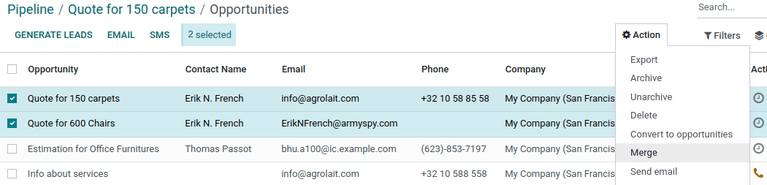
Tick the checkbox on the left of the page for the leads/opportunities to be merged. Then, click the Action icon at the top of the page, to reveal a drop-down menu. From that drop-down menu, select the Merge option to merge the selected opportunities or leads.
When Merge is selected from the Action drop-down menu, a Merge pop-up modal appears. In that pop-up modal, under the Assign opportunities to section, optionally select a Salesperson and Sales Team from the appropriate drop-down menus.
Below those fields, the leads/opportunities to merge are listed, along with their related information. To add more, click Add a line, tick the checkbox next to the desired leads/opportunities from the resulting Add: Leads/Opportunities' pop-up modal, then click the :guilabel:`Select button. The additional selections now appear in the list. To merge those selected leads/opportunities, click Merge.
The pop-up window disappears, and the detail card for the merged opportunity/lead appears.
Quando os leads/oportunidades não devem ser mesclados
Pode haver casos em que um lead ou oportunidade semelhante seja identificado, mas não deve ser mesclado. Essas circunstâncias variam, com base nos processos da equipe de vendas e da organização. Alguns cenários potenciais estão listados abaixo.
Leads perdidos
Se um lead/oportunidade tiver sido marcado como perdido, ele ainda pode ser mesclado com um lead ou uma oportunidade ativa. O lead/oportunidade resultante é marcado como ativo e adicionado ao funil.
Contato diferente dentro de uma organização
Os leads/oportunidades da mesma organização, mas com diferentes pontos de contato, podem não ter as mesmas necessidades. Nesse caso, é melhor não mesclar esses registros, embora a atribuição do mesmo vendedor ou equipe de vendas possa evitar trabalho duplicado e falhas de comunicação.
Duplicates with more than one salesperson
Se houver mais de um lead/oportunidade na base de dados, eles podem ter vários vendedores atribuídos que estão trabalhando ativamente de forma independente. Embora esses leads/oportunidades talvez precisem ser gerenciados separadamente, recomenda-se que todos os vendedores afetados sejam marcados em uma nota interna para maior visibilidade.
Contact information is similar, but not identical
Similar leads and opportunities are identified by comparing the email addresses and phone numbers of the associated contacts. However, if the email address is similar, but not identical, they may need to remain independent.