
Putaway rules
Putaway is the process of routing products to appropriate storage locations upon shipment arrival.
Odoo can accomplish this seamlessly using putaway rules, which dictate how products move through specified warehouse locations.
Upon shipment arrival, operations are generated based on putaway rules to efficiently move products to specified locations, and ensure easy retrieval for future delivery orders.
In warehouses that process specific kinds of products, putaway rules can also prevent volatile substances from being stored in close proximity, by directing them to different locations determined by the warehouse manager.
See also
Configuration
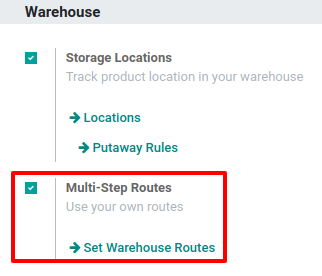
To use putaway rules, navigate to Inventory app -> Configuration -> Settings, and activate the Multi-Step Routes feature under the Warehouse section. By doing so, the Storage Locations feature is also automatically activated.
Finally, click Save.
Define putaway rule
To manage where specific products are routed for storage, navigate to Inventory app -> Configuration -> Putaway Rules. Use the Create button to configure a new putaway rule on a Product or Product Category that the rule affects.
In the same line, the When product arrives in location is where the putaway rule is triggered to create an operation to move the product to the Store to location.
For this to work, the Store to location must be a sub-location of the first (e.g., WH/Stock/Fruits is a specific, named location inside WH/Stock to make the products stored here easier to find).
Putaway rule priority
Odoo selects a putaway rule based on the following priority list (from highest to lowest) until a match is found:
- Package type and product
- Package type and product category
- Package type
- Product
- Product category