
Packaging
In Odoo Inventory, packaging refers to disposable containers holding multiple units of a specific product.
For example, different packages for cans of soda, such as a 6-pack, a 12-pack, or a case of 36, must be configured on the individual product form. This is because packagings are product specific, not generic.
Configuration
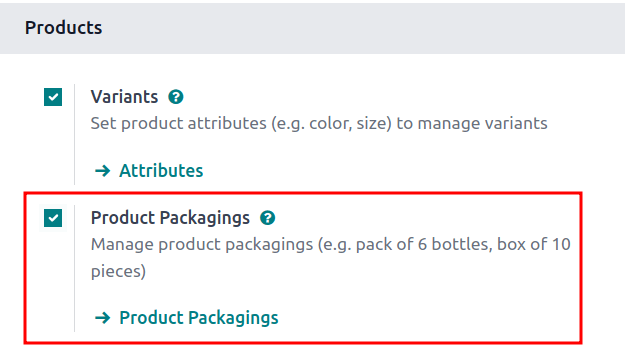
To use packagings, navigate to Inventory app -> Configuration -> Settings. Then, under the Products heading, enable the Product Packagings feature, and click Save.
Create packaging
Packagings can be created directly on the product form, or from the Product Packagings page.
From product form
Create packagings on a product form by going to Inventory app -> Products -> Products, and select the desired product.
Under the Inventory tab, scroll down to the Packaging section, and click Add a line. In the table, fill out the following fields:
- Packaging (required): name of packaging that appears on sales/purchase orders as a packaging option for the product.
- Contained quantity (required): amount of product in the packaging.
- Unit of Measure (required): measurement unit for quantifying the product.
- Sales: check this option for packagings intended for use on sales orders.
- Purchase: check this option for packagings intended for use on purchase orders.
- Barcode: identifier for tracing packaging in stock moves or pickings, using the Barcode app. Leave blank if not in use.
- Company: indicates the packaging is only available at the selected company. Leave blank to make the packaging available across all companies.
From product packagings page
To view all packagings that have been created, go to Inventory app -> Configuration -> Product Packagings. Doing so reveals the Product Packagings page with a complete list of all packagings that have been created for all products. Create new packagings by clicking New.
Partial reservation
After completing the packaging setup, packagings can be reserved in full or partial quantities for outgoing shipments. Partial packaging flexibility expedites order fulfillment by allowing the immediate shipment of available items, while awaiting the rest.
To configure packaging reservation methods, go to Inventory app -> Configuration -> Product Categories. Then, click New, or select the desired product category.
On the product category's form, in the Logistics section, Reserve Packagings can be set to Reserve Only Full Packagings or Reserve Partial Packagings.

Apply packagings
When creating a sales order in the Sales app, specify the packagings that should be used for the product. The chosen packaging is displayed on the SO under the Packaging field.