Rental
Odoo Rental is a comprehensive solution to manage your rentals.
From a single view, you can send out quotations, confirm orders, schedule rentals, register when products are picked up and returned, and invoice your customers.
Rental Pricing
Configuration
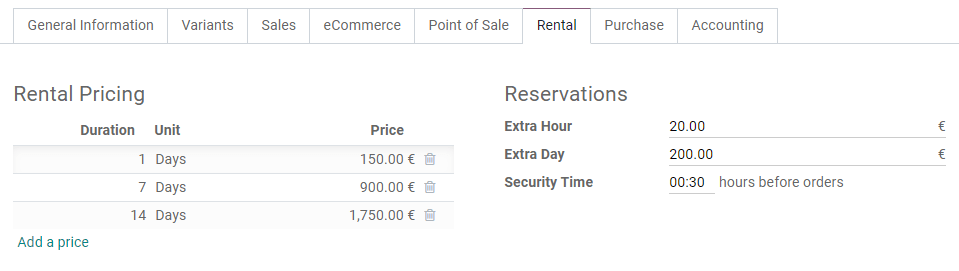
Go to Rental -> Products, select or create a product, and click on the product's Rental tab. Under Rental Pricing, click on Add a price. Then choose a Unit of time (hours, days, weeks, or months), a Duration, and a Price. You can add as many price lines as necessary, usually to give out discounts for longer rental durations.
Computing
Odoo always uses two rules to compute the price of a product when you create a rental order:
- Only one price line is used.
- The cheapest line is selected.
Customer signature
You can ask your customers to sign a rental agreement outlining the arrangement between you and your customers before they pick up products to make sure your products are returned on time and in their original condition. To do so, go to Rental -> Configuration -> Settings, activate Digital Documents, and Save.
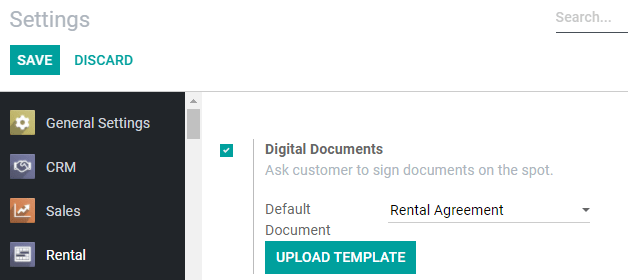
Once the app settings are saved, you have the option to change the default Rental Agreement from the dropdown menu. You can pick any document already uploaded to the Sign app, or upload a new one to the Sign app by clicking on Upload Template.
To request a customer signature, select a confirmed rental order, click on Sign Documents, choose the document template and click on Sign Documents again. On the next window, select your customer and click on Sign Now to start the signing process with your customer. Once the document is completed, click on Validate & Send Completed Document.
See also
Pickup and Return receipt
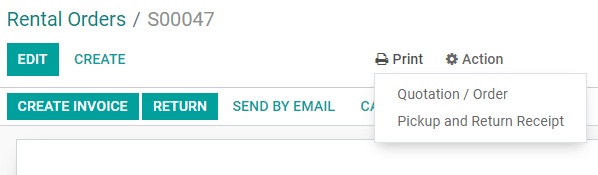
You can print and give your customers receipts when they pick up and/or return products. To do so, open any rental order, click on Print and select Pickup and Return Receipt. Odoo then generates a PDF detailing all information about the current status of the rented items: which were picked up, when they are expected to be returned, which were returned, and potential rental delay costs.