Pro-forma invoices
Standard Odoo workflow. Also read the KMEE procedure for the Brazilian modules.
A pro-forma invoice is an abridged or estimated invoice sent in advance of a delivery of goods. It notes the kind and quantity of goods, their value, and other important information, such as weight and transportation charges.
Pro-forma invoices are commonly used as preliminary invoices with a quotation. They are also used during importation for customs purposes. They differ from a normal invoice, in that they are not a demand (or request) for payment.
Configuration
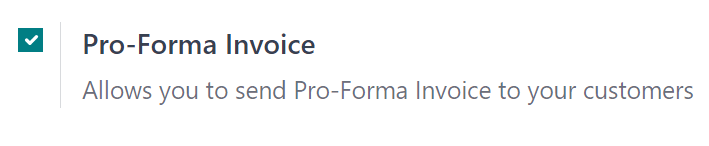
In order to utilize pro-forma invoices, the Pro-Forma Invoice feature must be activated.
To enable this feature, navigate to Sales app -> Configuration -> Settings, and in the Quotations & Orders section, click the checkbox next to Pro-Forma Invoice. Then, click Save to save all changes.
Send pro-forma invoice
With the Pro-Forma Invoice feature activated, the option to send a pro-forma invoice is now available on any quotation or sales order, via the Send Pro-Forma Invoice button.
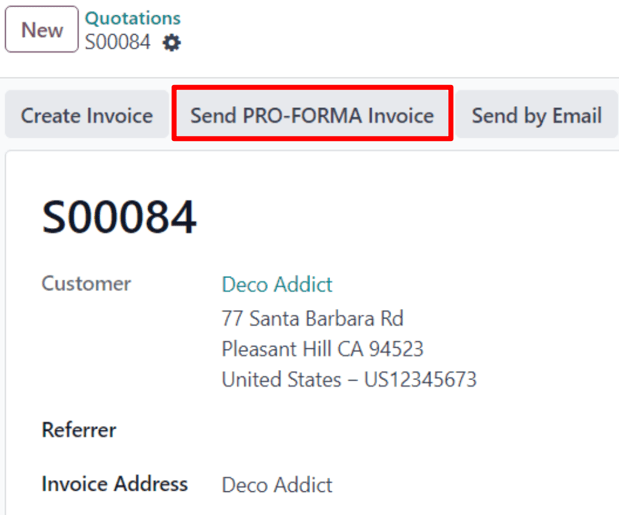
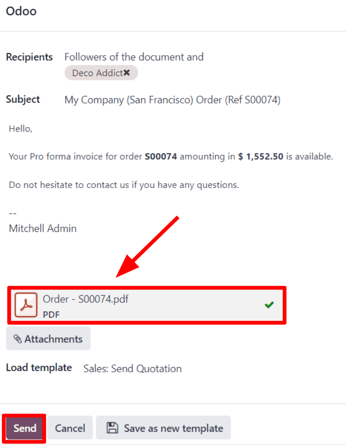
When the Send Pro-Forma Invoice button is clicked, a pop-up window appears, from which an email can be sent.
In the pop-up window, the Recipients field is auto-populated with the customer from the sales order or quotation. The Subject field and the body of the email can be modified, if necessary.
The pro-forma invoice is automatically added as an attachment to the email.
When ready, click Send, and Odoo instantly sends the email, with the attached pro-forma invoice, to the customer.