
Facturación electrónica (EDI)
Flujo estándar de Odoo. Consulte también el procedimiento KMEE para los módulos brasileños.
EDI, o intercambio electrónico de datos, es la comunicación entre empresas de documentos empresariales, como órdenes de compra y facturas, en formato estándar. Si envía documentos que cumplen con el estándar EDI se podrá asegurar de que la máquina que reciba el mensaje podrá interpretar la información de manera correcta. Hay muchos formatos EDI que están disponibles dependiendo del país de su empresa.
La función EDI permite automatizar la administración entre empresas, además de que es posible que algunos gobiernos lo pidan para facilitar el control fiscal y la administración
Uno de los usos de EDI es que podrá crear facturas y notas de crédito en formato electrónico.
Los siguientes formatos, entre otros, son compatibles con Odoo.
| Nombre de Formato | Aplicación |
|---|---|
| Factur-X (PDF/A-3) | Para las empresas de Francia y Alemania |
| Peppol BIS Billing 3.0 (UBL BIS Billing 3.0) | Para empresas que están en países que están dentro de la lista EAS |
| E-FFF | Para empresas de Bélgica |
| XRechnung (UBL) | Para las empresas de Alemania |
| Fattura PA (IT) | Para las empresas de Italia |
| CFDI (4.0) | Para las empresas de México |
| Perú UBL 2.1 | Para las empresas de Perú |
| SII IVA Llevanza de libros registro (ES) | Para las empresas de España |
| UBL 2.1 (Colombia) | Para las empresas de Colombia |
| Autoridad fiscal de Egipto | Para empresas egipcias |
| E-Invoice (IN) | Para las empresas de India |
| NLCIUS (Países Bajos) | Para empresas neerlandesas |
| EHF 3.0 | Para empresas noruegas |
| Facturación SG BIS 3.0 | Para empresas singapurenses |
| A-NZ BIS Billing 3.0 | Para empresas australianas o neozelandesas |
| Peppol | For Peppol |
Ver también
Fiscal localizations
Configuración
Vaya a Contabilidad -> Configuración -> Diarios -> Facturas del cliente -> Ajustes avanzados -> Facturación electrónica y active los formatos que necesita para este diario.
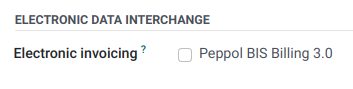
Después de que active el formato de facturación electrónica, se generarán los documentos XML cuando haga clic en el botón Confirmar que está en los documentos como facturas, notas de crédito, etc. Podrá encontrar estos documentos en la sección de archivos adjuntos o incrustados en el PDF.
Peppol
The Peppol network ensures the exchange of documents and information between companies and governmental authorities. It is primarily used for electronic invoicing, and its access points (connectors to the Peppol network) allow companies to send electronic documents such as customer invoices and credit notes and receive documents like vendor bills and refunds.
In this case, Odoo acts as both an access point and an SMP and enables electronic invoicing transactions without the need to send invoices or bills by email or post.
Registration
To register on Peppol, go to Accounting -> Configuration -> Settings, scroll to the PEPPOL Electronic Document Invoicing section, and fill in the following information:
-
Peppol EAS: Peppol Electronic Address Scheme, which usually depends on the company's country. This field is often prefilled with your country's most commonly used EAS code. For example, the preferred EAS code for most companies in Belgium is
0208. -
Peppol Endpoint: usually a Company Registry number or a VAT number
-
Mobile Number, including the country code (e.g.,
+32in Belgium) -
Primary contact email
Ver también
- Peppol EAS - European Commision
- Peppol endpoint - OpenPeppol eDEC Code Lists (open the "Participant Identifier Schemes" as HTML page)
- Click Validate registration.
- The registration should be automatically activated, and the Application status should be updated within a day.
- Select another purchase journal in the Incoming Invoices Journal field if necessary.
All invoices can then be sent directly using Peppol.
Contact verification
Before sending an invoice to a contact using Peppol, make sure the contact is registered as a Peppol participant. To do so, follow these steps:
- Go to Accounting -> Customers -> Customers and access the customer's form.
- In the Accounting tab, check the following information in the Electronic Invoicing section:
- Format: BIS Billing 3.0, XRechnung CIUS, or NLCIUS.
- Peppol e-address (EAS): Select the relevant EAS code in the dropdown list.
- Peppol Endpoint: Enter the customer's endpoint identifier.
- Click Verify. Its Peppol endpoint validity is marked as Valid if the contact is found on the Peppol network.
Send invoices
To generate Peppol documents for invoices of a journal enable the EDI format called 'Peppol' on the journal. This should have happened automatically for countries in which Peppol is used by installing the module. Then confirming an invoice will generate Peppol a document in the format selected on the partner during the contact verification.
Posted invoices to be sent via Peppol are marked as Ready to send in the invoice's PEPPOL status field.
To send the invoice to the customer via Peppol, click Send & Print on the confirmed invoice form. In the Send window, enable Send via PEPPOL options, then click Send & Print (or Send or Send (Peppol) or Print depending on which of the Print and Email options are selected).
Once the invoices are sent via Peppol, their PEPPOL status is changed to Processing.
The status is updated to Done once the invoices have been successfully delivered to the contact's access point.
Receive vendor bills
New documents received via Peppol are checked multiple times a day. Received documents are automatically imported into the purchase journal set in the PEPPOL Electronic Document Invoicing section, and corresponding vendor bills are created as drafts and appear in the vendor bills list view.
Peppol deregistration from Odoo
Only one Peppol receiver registration can be active for each Peppol endpoint identifier at a time. To stop using Odoo as the Peppol access point, e.g., to switch to another provider or reconfigure the registration for a new database, you must first deregister from Peppol. To do so, go to Accounting -> Configuration -> Settings, scroll down to the PEPPOL Electronic Invoicing section, and click Deregister from Peppol.
Once removed, the Peppol registration is deleted from the database, and documents can no longer be sent or received via Peppol in Odoo.