Warehouses
In the Odoo Inventory app, a warehouse is a physical space with an address for storing items, such as a storage facility, distribution center, or physical store.
Each database has a pre-configured warehouse with the company's address. Users can set up multiple warehouses, and create stock moves between them.
Configuration
To create or manage warehouses, go to Inventory app -> Configuration -> Warehouses.
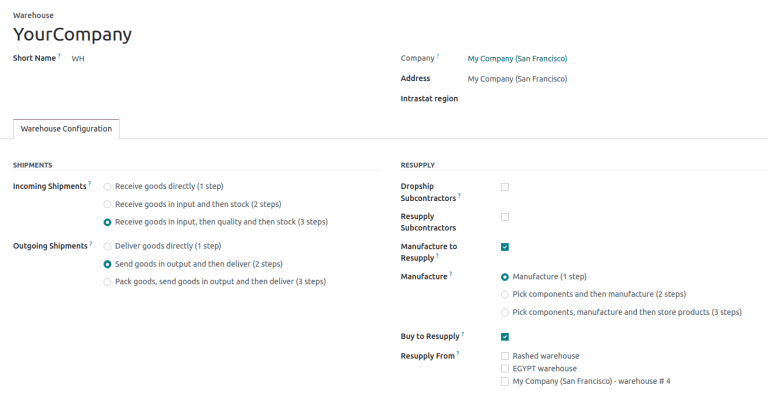
Then, select an existing warehouse, or create a new one by clicking New. Doing so opens the warehouse form, which contains the following fields:
-
Warehouse (required field): the full name of the warehouse.
-
Short Name (required field): the abbreviated code for the warehouse (maximum five characters). The short name for the default warehouse in Odoo is
WH. -
Address (required field): the address of the warehouse. To change the warehouse address when creating two or more warehouses, hover over the field, and click the (right arrow).
-
Company (required field): the company that owns the warehouse; this can be set as the company that owns the Odoo database, or the company of a customer or vendor.
-
Intrastat region: region name required for companies in the European Union.
- Incoming Shipments: select the option to receive products from the warehouse in one, two, or three steps.
- Outgoing Shipments: select the option to deliver products from the warehouse in one, two, or three steps.
- Dropship Subcontractors: available with the Subcontracting feature enabled in Manufacturing app -> Configuration -> Settings. Tick this checkbox to purchase components from vendors, and dropship them to subcontractors.
- Resupply Subcontractors: available with the Subcontracting feature, tick this checkbox to supply subcontractors with raw materials stored in this specific warehouse.
- Manufacture to Resupply: tick this checkbox to allow for items to be manufactured in this warehouse.
- Manufacture: choose whether to manufacture products in one, two, or three steps.
- Buy to Resupply: tick this checkbox to allow for purchased products to be delivered to the warehouse.
- Resupply From: available with multiple warehouses in the database, select warehouses to pull stock from to fulfill orders.