
Using inventory valuation
Inventory valuation is a quintessential accounting procedure that calculates the value of on-hand stock. Once determined, the inventory valuation amount is then incorporated into a company's overall value.
In Odoo, this process can be conducted manually— by warehouse employees physically counting the products— or automatically through the database.
Automatic inventory valuation
To use Odoo to automatically generate a trail of inventory valuation entries, first navigate to the Product Categories list by going to Inventory app -> Configuration -> Product Categories and select the desired product category. On the form, set the Inventory Valuation as Automated and the Costing Method to any of the three options.
See also
In order to understand how moving products in and out of stock affects the company's overall value, consider the following product and stock moves scenario below.
Receive a product
To track the value of incoming products, such as a simple table, configure the product category on the the product itself. To get there, navigate to Inventory app -> Products -> Products and click the desired product. On the product form, click the ➡️ (right arrow) icon beside the Product Category field, which opens an internal link to edit the product category. Next, set the Costing Method as First In First Out (FIFO) and Inventory Valuation as Automated.
Next, assume 10 tables are purchased at a price of $10.00, each. The PO for those tables will show the subtotal of the purchase as $100, plus any additional costs or taxes.

After selecting Validate on the PO, the Valuation smart button is enabled. Clicking on this button displays a report showing how the inventory valuation for the table was affected by this purchase.
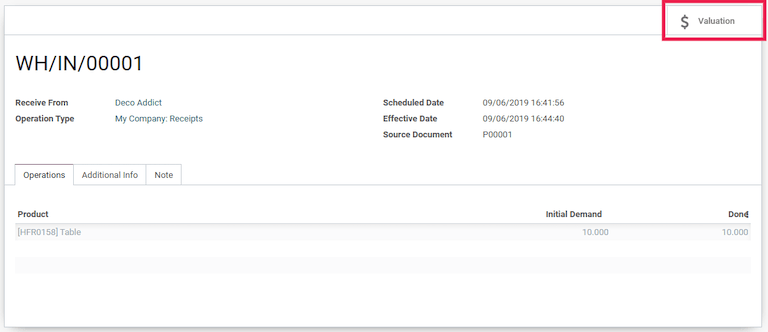
For a comprehensive dashboard that includes the inventory valuation of all product shipments, inventory adjustments, and warehouse operations, refer to the stock valuation report.
Deliver a product
In the same logic, when a table is shipped to a customer and leaves the warehouse, the stock valuation decreases. The Valuation smart button on the DO, likewise, displays the stock valuation record as it does on a PO.

Inventory valuation report
To view the current value of all products in the warehouse, first turn on Developer mode and navigate to Inventory app -> Reporting -> Valuation. The Stock Valuation dashboard displays detailed records of products with the Date, Quantity, Unit Value, and Total Value of the inventory.
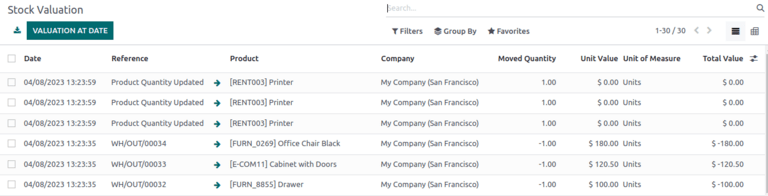
The Valuation At Date button, located in the top-left corner of the Stock Valuation page, reveals a pop-up window. In this pop-up, the inventory valuation of products available during a prior specified date can be seen and selected.
Update product unit price
For any company: lead times, supply chain failures, and other risk factors can contribute to invisible costs. Although Odoo attempts to accurately represent the stock value, manual valuation serves as an additional tool to update the unit price of products.
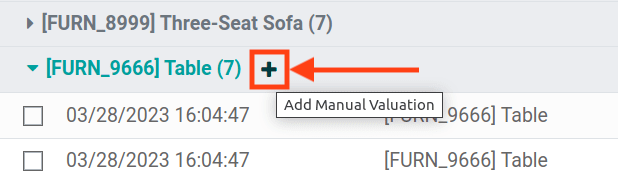
Create manual valuation entries on the Stock Valuation dashboard by first navigating to Inventory app -> Reporting -> Valuation. Next, to enable the product revaluation feature, select Group by -> Product to organize all the records by product. Click on the gray ▶️ (drop-down triangle) icon to reveal stock valuation line items below, as well as a teal ➕ (plus) button on the right.
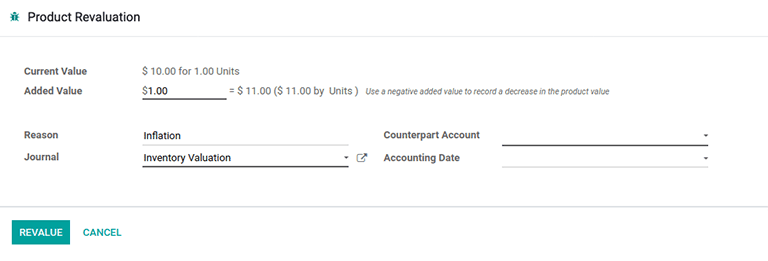
Click the teal + (plus) button to open up the Product Revaluation form. Here, the inventory valuation for a product can be recalculated, by increasing or decreasing the unit price of each product.
Inventory valuation journal entries
In Odoo, automatic inventory valuation records are also recorded in the Accounting app -> Accounting -> Journal Entries dashboard. On this comprehensive list of accounting entries, inventory valuation records are identified by checking values in the Journal column, or looking for the Reference column value which matches the warehouse operation reference (e.g. WH/IN/00014 for receipts).
Clicking on an inventory valuation journal entry opens a double-entry accounting record. These records are generated by Odoo to track the change of value in inventory valuation as products are moved in and out of the warehouse.