
Cash discounts and tax reduction
Standard Odoo workflow. Also read the KMEE procedure for the Brazilian modules.
Cash discounts are reductions in the amount a customer must pay for goods or services offered as an incentive for paying their invoice promptly. These discounts are typically a percentage of the total invoice amount and are applied if the customer pays within a specified time. Cash discounts can help the company maintain a steady cash flow.
A tax reduction can also be applied depending on the country or region.
Configuration
To grant cash discounts to customers, you must first set up the type of tax reduction, verify the gain and loss accounts, and configure new payment terms.
Tax reductions
Depending on the country or region, the base amount used to compute the tax can vary, which can lead to a tax reduction.
To configure how the tax reduction is applied, go to Accounting -> Configuration -> Settings, and in the Taxes section, in the Cash Discount Tax Reduction feature, select one of the three following options:
-
Always (upon invoice)
-
The tax is always reduced. The base amount used to compute the tax is the discounted amount, whether the customer benefits from the discount or not.
-
On early payment
-
The tax is reduced only if the customer pays early. The base amount used to compute the tax is the same as the sale: if the customer benefits from the reduction, then the tax is reduced. This means that, depending on the customer, the tax amount can vary after the invoice is issued.
-
Never
-
The tax is never reduced. The base amount used to compute the tax is the full amount, whether the customer benefits from the discount or not.
Cash discount gain/loss accounts
With a cash discount, the amount you earn depends on whether the customer benefits from the cash discount or not. This inevitably leads to gains and losses, which are recorded on default accounts.
To modify these accounts, go to Accounting -> Configuration -> Settings, and in the Default Accounts section, select the accounts you want to use for the Cash Discount Gain account and Cash Discount Loss account.
Payment terms
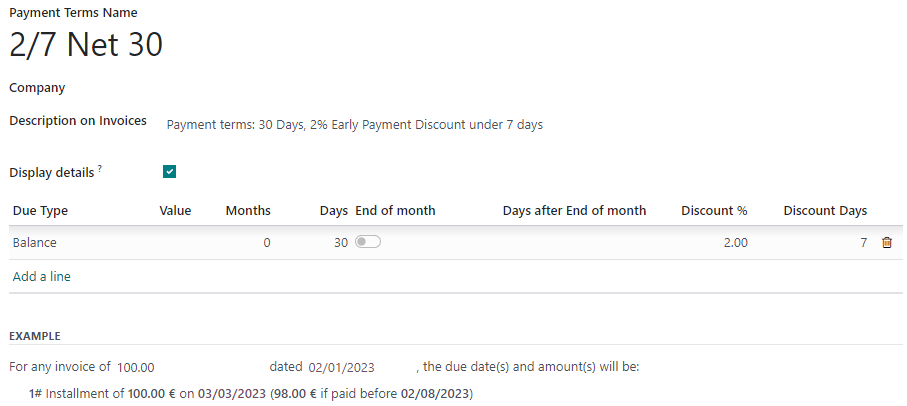
Cash discounts are defined on payment terms. Configure them to your liking by going to Accounting -> Configuration -> Payment Terms, and make sure to fill out the fields Discount % and Discount Days.
Apply a cash discount to a customer invoice
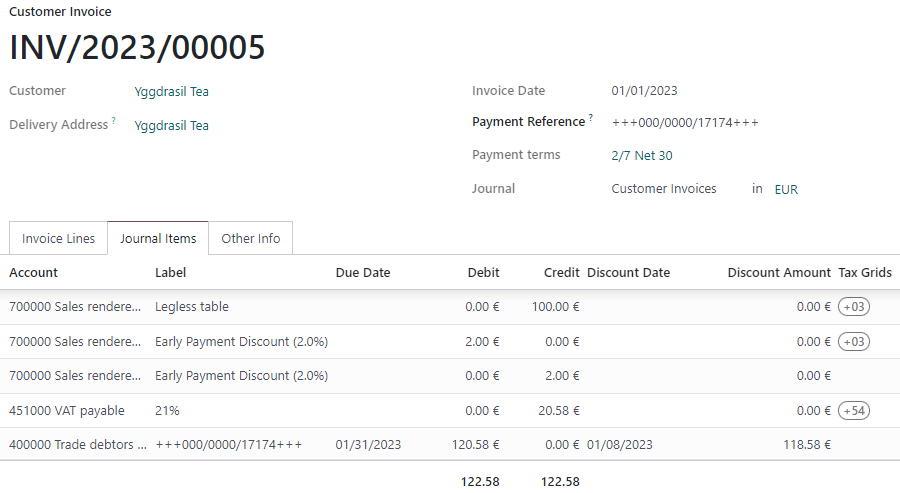
Apply a cash discount to a customer invoice by selecting the payment terms you created. Odoo automatically computes the correct amounts, tax amounts, due dates, and accounting records.
Under the Journal Items tab, you can display the discount details by clicking on the "toggle" button and adding the Discount Date and Discount Amount columns.
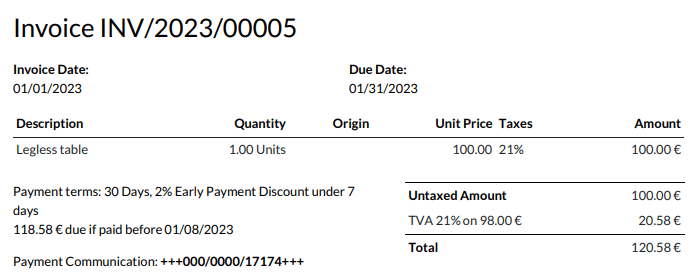
The discount amount and due date are also displayed on the generated invoice sent to the customer.
Payment reconciliation
When you record a payment or reconcile your bank statements, Odoo takes the customer payment's date into account to define if they can benefit from the cash discount or not.
See also