
Snailmail
Standard Odoo workflow. Also read the KMEE procedure for the Brazilian modules.
Sending direct mail can be an effective strategy for grabbing people's attention, especially when their email inboxes are overflowing. With Odoo, you have the ability to send invoices and follow-up reports through postal mail worldwide, all from within your database.
Configuration
Go to Accounting -> Configuration -> Settings -> Customer invoices section to activate Snailmail.
To make it a by-default feature, select Send by Post in the Default Sending Options section.
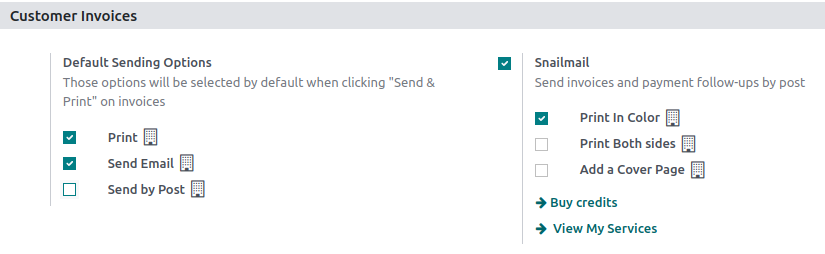
Send invoices by post
Open your invoice, click on Send & Print and select Send by Post. Make sure your customer’s address is set correctly, including the country, before sending the letter.
Pricing
Snailmail is an In-app purchases (IAP) service that requires prepaid stamps (=credits) to work. Sending one document consumes one stamp.
To buy stamps, go to Accounting -> Configuration -> Settings -> Customer invoices: Snailmail, click on Buy credits, or go to Settings -> In-App Purchases: Odoo IAP, and click on View my Services.
See also