Average price on returned goods
Standard Odoo workflow. Also read the KMEE procedure for the Brazilian modules.
Average cost valuation (AVCO) is an inventory valuation method that evaluates cost based on the total cost of goods bought or produced during a period, divided by the total number of items on-hand. Inventory valuation is used to:
- reflect the value of a company's assets;
- keep track of the amount of unsold goods;
- account for monetary value in goods that have yet to generate profit;
- report on flow of goods throughout the quarter.
Because AVCO uses the weighted average to evaluate the cost, it is a good fit for companies that sell only a few different products in large quantities. In Odoo, this costing analysis is automatically updated each time products are received.
Thus, when shipments are returned to their supplier, Odoo automatically generates accounting entries to reflect the change in inventory valuation. However, Odoo does not automatically update the AVCO calculation, because this can potentially create inconsistencies with inventory valuation.
Configuration
To use average cost inventory valuation on a product, navigate to Inventory -> Configuration -> Product Categories and select the category that will be using AVCO. On the product category page, set Costing Method to Average Cost (AVCO) and Inventory Valuation to Automated.
Using average cost valuation
The average cost method adjusts the inventory valuation when products are received in the warehouse. This section explains how it works, but if the explanation is unnecessary, skip to the return to supplier use case section.
Formula
When new products arrive, the new average cost for each product is recomputed using the formula:
- Old Qty: product count in stock before receiving the new shipment;
- Old Avg Cost: calculated average cost for a single product from the previous inventory valuation;
- Incoming Qty: count of products arriving in the new shipment;
- Purchase Price: estimated price of products at the reception of products (since vendor bills may arrive later). The amount includes not only the price for the products, but also added costs, such as shipping, taxes, and landed costs. At reception of the vendor bill, this price is adjusted;
- Final Qty: quantity of on-hand stock after the stock move.
Compute average cost
To understand how the average cost of a product changes with each shipment, consider the following table of warehouse operations and stock moves. Each is a different example of how the average cost valuation is affected.
| Operation | Incoming Value | Inventory Value | Qty On Hand | Avg Cost |
|---|---|---|---|---|
| $0 | 0 | $0 | ||
| Receive 8 tables at $10/unit | 8 * $10 | $80 | 8 | $10 |
| Receive 4 tables at $16/unit | 4 * $16 | $144 | 12 | $12 |
| Deliver 10 tables | -10 * $12 | $24 | 2 | $12 |
Product delivery (use case)
For outgoing shipments, outbound products have no effect on the average cost valuation. Although the average cost valuation is not recalculated, the inventory value still decreases because the product is removed from stock and delivered to the customer location.
Return items to supplier (use case)
Because the price paid to suppliers can differ from the price the product is valued at with the AVCO method, Odoo handles returned items in a specific way.
- Products are returned to suppliers at the original purchase price, but;
- The internal cost valuation remains unchanged.
The above example table is updated as follows:
| Operation | Qty*Avg Cost | Inventory Value | Qty On Hand | Avg Cost |
|---|---|---|---|---|
| $24 | 2 | $12 | ||
| Return 1 table bought at $10 | -1 * $12 | $12 | 1 | $12 |
In other words, returns to vendors are perceived by Odoo as another form of a product exiting the warehouse. To Odoo, because the table is valued at $12 per unit, the inventory value is reduced by $12 when the product is returned; the initial purchase price of $10 is unrelated to the table's average cost.
Eliminate stock valuation errors in outgoing products
Inconsistencies can occur in a company's inventory when the average cost valuation is recalculated on outgoing shipments.
To demonstrate this error, the table below displays a scenario in which 1 table is shipped to a customer and another is returned to a supplier at the purchased price.
| Operation | Qty*Price | Inventory Value | Qty On Hand | Avg Cost |
|---|---|---|---|---|
| $24 | 2 | $12 | ||
| Ship 1 product to customer | -1 * $12 | $12 | 1 | $12 |
| Return 1 product initially bought at $10 | -1 * $10 | $2 | 0 | $12 |
In the final operation above, the final inventory valuation for the table is $2 even though there are 0 tables left in stock.
Anglo-Saxon accounting
In addition to using AVCO, companies that use Anglo-Saxon accounting also keep a holding account that tracks the amount to be paid to vendors. Once a vendor delivers an order, inventory value increases based on the vendor price of the products that have entered the stock. The holding account (called stock input) is credited and only reconciled once the vendor bill is received.
See also
The table below reflects journal entries and accounts. The stock input account stores the money intended to pay vendors when the vendor bill has not yet been received. To balance accounts when returning products that have a price difference between the price the product is valued at and the price it was bought for, a price difference account is created.
| Operation | Stock Input | Price Diff | Inventory Value | Qty On Hand | Avg Cost |
|---|---|---|---|---|---|
| $0 | 0 | $0 | |||
| Receive 8 tables at $10 | ($80) | $80 | 8 | $10 | |
| Receive vendor bill $80 | $0 | $80 | 8 | $10 | |
| Receive 4 tables at $16 | ($64) | $144 | 12 | $12 | |
| Receive vendor bill $64 | $0 | $144 | 12 | $12 | |
| Deliver 10 tables to customer | $0 | $24 | 2 | $12 | |
| Return 1 table initially bought at $10 | $10 | $2 | $12 | 1 | $12 |
| Receive vendor refund $10 | $0 | $2 | $12 | 1 | $12 |
Product reception
Summary
At product reception, Odoo ensures companies can pay for goods that were purchased by preemptively moving an amount matching the price of received goods into the liability account, Stock Input. Then, once the bill has been received, the amount in the holding account is transferred to Accounts Payable. Transfers into this account means the bill has been paid. Stock Input is reconciled once the vendor bill is received.
Inventory valuation is a method of calculating how much each in-stock product is worth internally. Since there is a difference between the price the product is valuated at and the price the product was actually purchased for, the Inventory Valuation account is unrelated to the crediting and debiting operations of the Stock Input account.
To conceptualize all this, follow the breakdown below.
Accounts balanced at received products
In this example, a company starts with zero units of a product, table, in stock. Then, 8 tables are received from the vendor:
- The Stock Input account stores
$80of credit owed to the vendor. The amount in this account is unrelated to the inventory value. $80worth of tables came in (debit the Inventory Value account$80), and$80must be paid out for received goods (credit the Stock Input account$80).
In Odoo
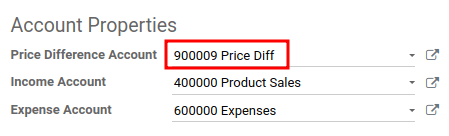
Odoo generates an accounting journal entry when shipments that use AVCO costing method are received. Configure a Price Difference Account by selecting the ➡️ (arrow) icon next to the Product Category field on the product page.
Under Account Properties, create a new Price Difference Account by typing in the name of the account and clicking Create and Edit. Then set the account Type as Expenses, and click Save.
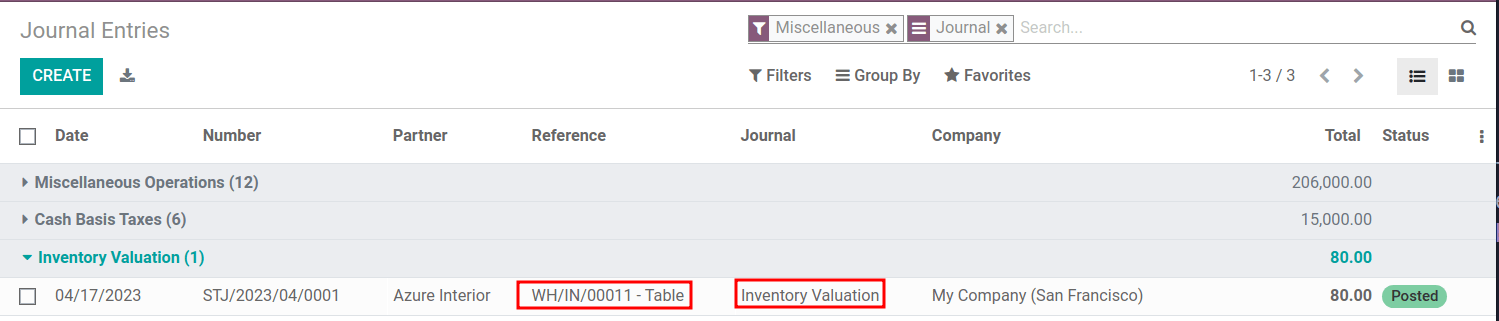
Then, receive the shipment in the Purchase app or Inventory app, and navigate to the Accounting app -> Accounting -> Journal Entries. In the list, find the Reference that matches the warehouse reception operation for the relevant product.
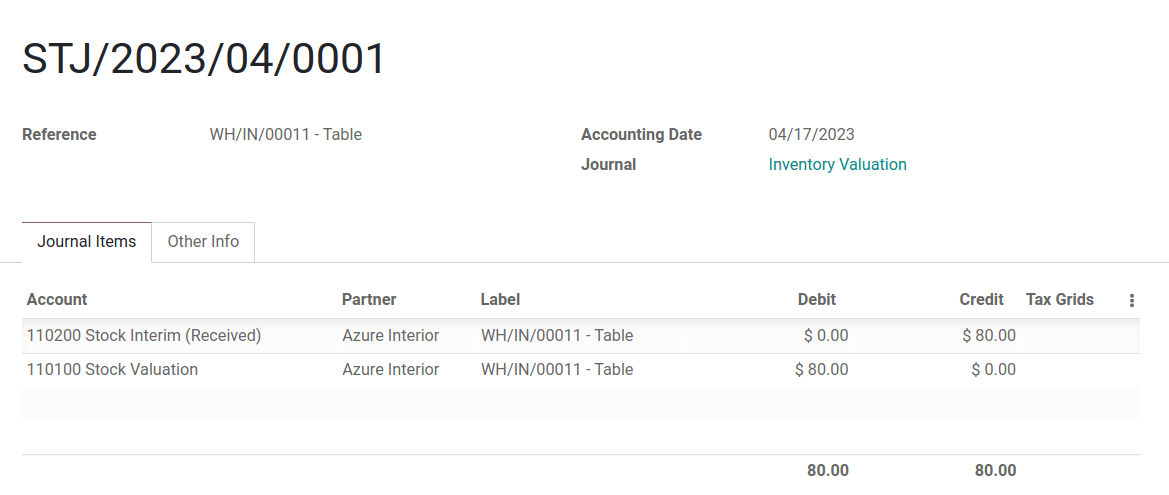
Click on the line for 8 tables. This accounting journal entry shows that when the 8 tables were received, the Stock Valuation account increased by $80. Conversely, the Stock Input account (set as Stock Interim (Received) account by default) is credited $80.
Accounts balanced at received vendor bill
In this example, a company starts with zero units of a product, table, in stock. Then, 8 tables are received from the vendor. When the bill is received from vendor for 8 tables:
- Use
$80in the Stock Input account to pay the bill. This cancels out and the account now holds$0. - Debit Stock Input
$80(to reconcile this account). - Credit Accounts payable
$80. This account stores the amount the company owes others, so accountants use the amount to write checks to vendors.
In Odoo
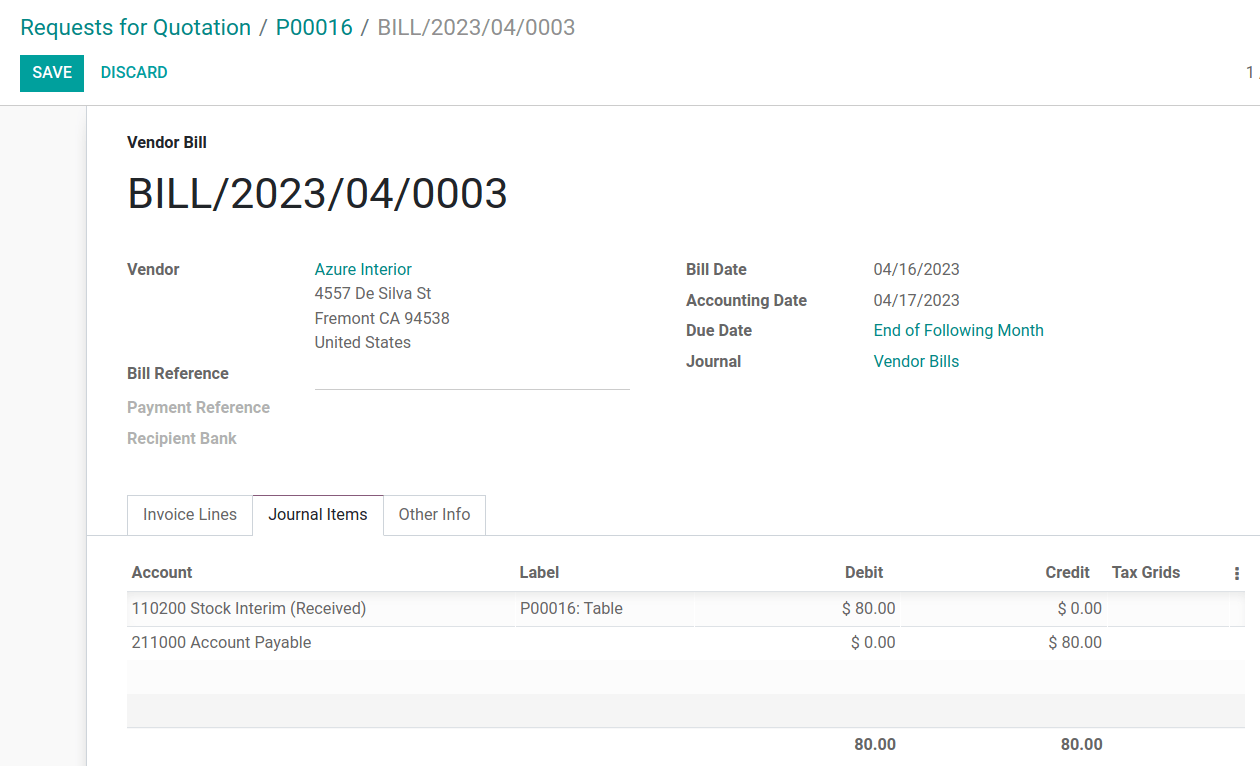
Once the vendor requests payment, navigate to the Purchase app -> Orders -> Purchase and select the PO for 8 tables. Inside the PO, select Create Bill.
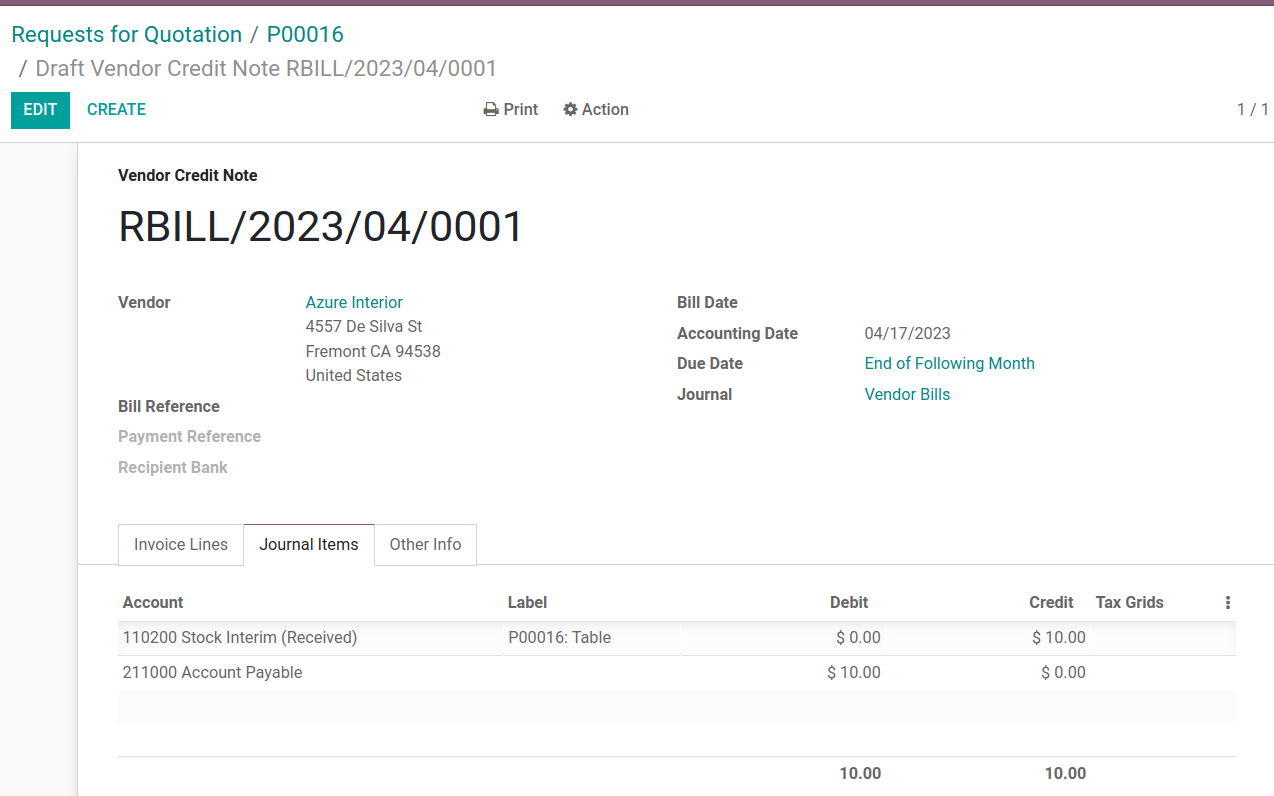
Switch to the Journal Items tab to view how $80 is transferred from the holding account, Stock Interim (Received) to Accounts Payable. Confirm the bill to record the payment to the vendor.
On product delivery
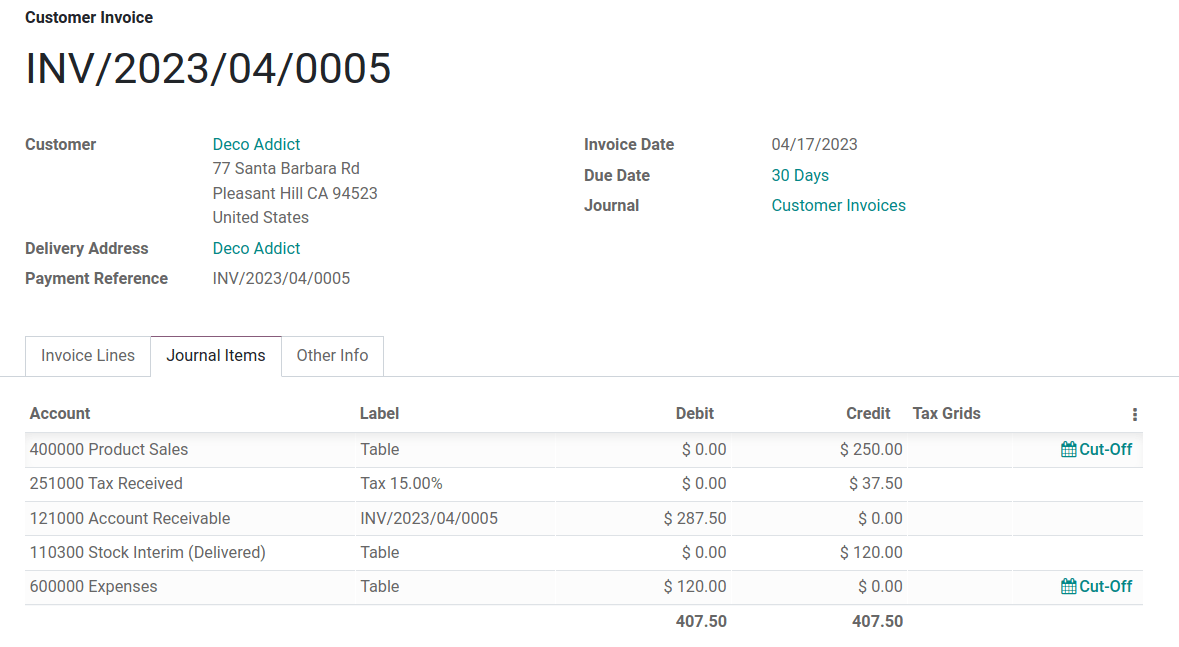
In the above example table, when 10 products are delivered to a customer, the Stock Input account is untouched because there are no new products coming in. To put it simply:
- Inventory valuation is credited
$120. Subtracting from inventory valuation represents$120worth of products exiting the company. - Debit Accounts Receivable to record revenue from the sale.
Understand Anglo-Saxon expensing
In the accounting journal entry invoicing a customer for 10 tables, the accounts Product Sales, Tax Received, and Accounts Receivable all pertain to the sale of the product. Accounts Receivable is the account where the customer payment will be received.
Anglo-Saxon accounting recognizes the cost of goods sold (COGS) once the sale is made. So, up until the product is sold, scrapped, or returned, costs of keeping the product in stock are not accounted for. The Expense account is debited $120 to log the costs of storing 10 tables during this period of time.
On product return
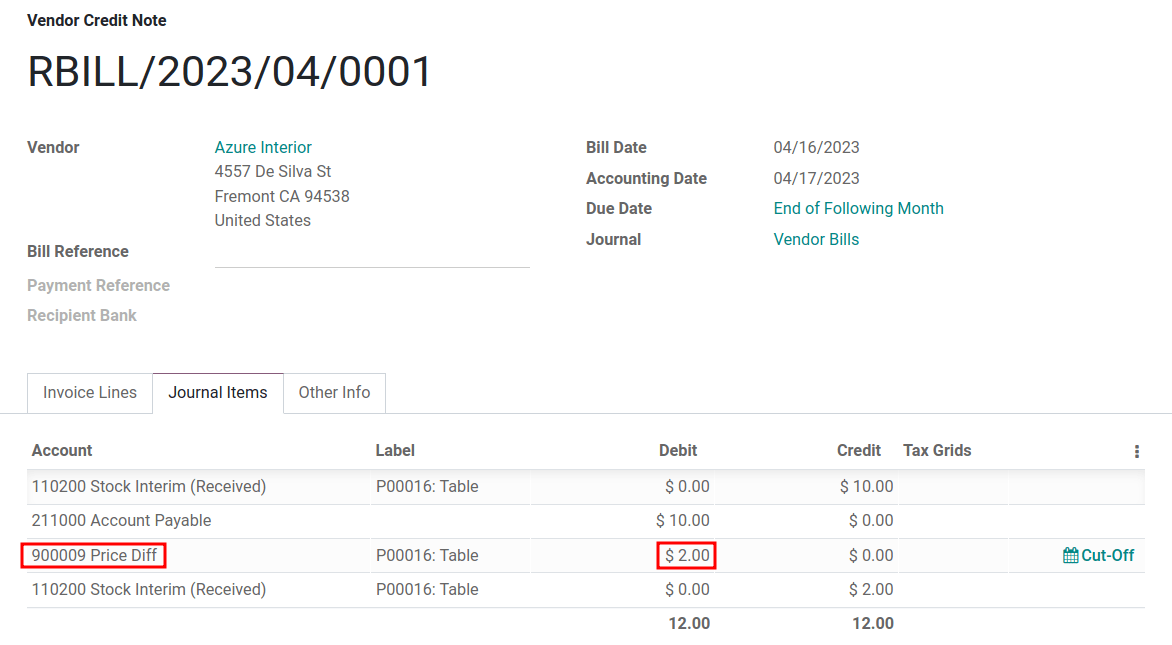
In the above example table, when returning 1 product to a vendor purchased at $10, a company expects $10 in the Accounts Payable account from the vendor. However, Stock Input account must be debited $12 because the average cost is $12 at the time of the return. The missing $2 is accounted for in the Price Difference Account, which is set up in the product's Product Category.
Summary:
- Debit Stock Input account
$10to move the table from stock to stock input. This move is to indicate that the table is to be processed for an outgoing shipment. - Debit Stock Input an additional
$2to account for the Price Difference. - Credit Stock Valuation
$12because the item is leaving the stock.
Once the vendor's refund is received,
- Credit Stock Input account
$10to reconcile the price of the table. - Debit Accounts Payable
$10to have the accountants collect and register the payment in their journal.